Catalog quality reporting
Shoppers compare. When a product page has a missing specification, a wrong unit or two different weights, they notice, and they buy somewhere else. Catalog quality reports check every product page in your store, compare it with the other products in its category, and tell you exactly what to fix and where to find it.
A second pair of eyes on every product page
Keeping hundreds or thousands of product pages correct by hand is impossible. Suppliers deliver data in different formats, colleagues use different labels, and a typo slips in with every update.
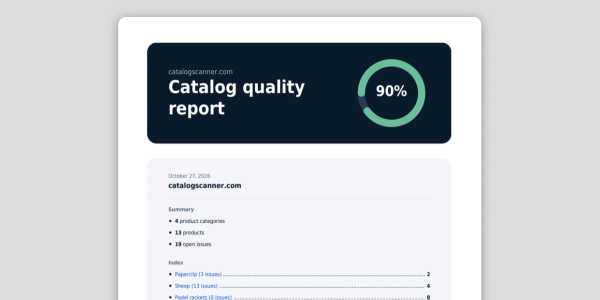
What the report checks
Missing specifications
When most other products in a category list a specification and this one doesn't, you'll know. A padel racket without a weight, a dimmer without a maximum load.
Specifications that aren't in the spec table
The value is mentioned somewhere in the description, but not in the list or table with specifications where shoppers and search engines look for it.
Deviating labels
"Gewicht" on one page, "Weight (g)" on another, "Mass" on a third. The report shows which label the rest of the category uses, so your pages stay consistent.
Missing or deviating units
A value without a unit, or centimetres where the rest of the category uses millimetres. The report tells you which unit to use.
Values that stand out
A battery capacity ten times higher than any other product in the category is usually a typo. Outliers are flagged so you can double-check them.
Conflicting information
The same property with two different values on one page, for example 5 kg in the specifications and 6 kg in the description.
Spelling mistakes
Real spelling errors, checked in the language of your store. Brand names, model numbers and technical terms are left alone.
Every issue comes with a fix
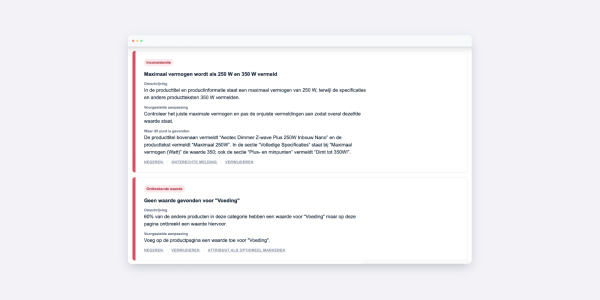
A list of problems is only useful if you know what to do with it. For every issue the report gives you:
- What's wrong, in plain language, without technical jargon.
- Where to find it on the product page, quoting the exact text.
- How to fix it, for example: "Add unit 'mm' to attribute 'Thickness' on this product page."
- How important it is: high, medium or low severity, with the most important issues listed first.
Issues are grouped per category and per product, so you can hand a category to the colleague who manages it.
Track your progress, report after report
Your catalog changes all the time, so a single check isn't enough. Choose how often you want a new report: every day, every other day, every week or every four weeks. A report is only created once the latest scan of your store has been fully processed, so it always reflects one consistent state of your catalog.
Each report shows how things have changed since the last one:
- New: issues that showed up since the previous report.
- Persistent: issues that were already reported and still need attention.
- Fixed: issues that have been solved since the last report.
That way you can see right away whether your catalog is getting better, and which issues keep coming back.
Better product pages, more sales
Complete, consistent product information helps shoppers choose, lowers the number of questions your customer service gets and gives search engines more to work with. And because the comparison widget uses the same product data, every fix also makes your comparisons better.
Quality reports are part of every plan. The number of (re)scans for issues depends on your plan.